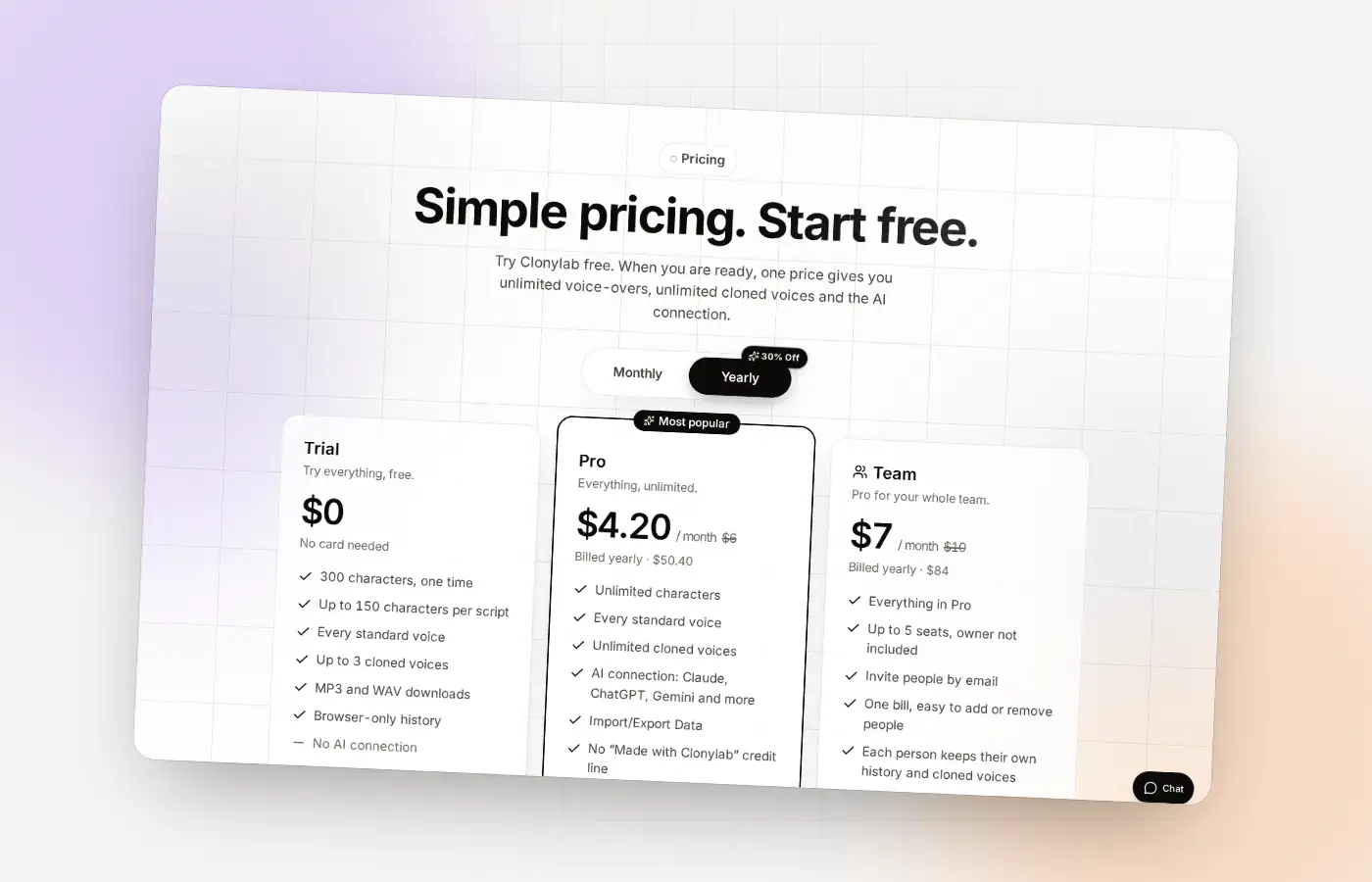
The Team plan at a glance
| Who | The owner plus up to 5 invited people |
|---|---|
| Features | Everything in Pro: unlimited characters and cloned voices, the AI connection |
| Who pays | The owner, once, for everyone |
| Price | ₹899 a month (US$10 outside India), cheaper yearly |
| How people join | The owner invites them by email |
| Where work is kept | In each person’s own browser |
What the Team plan is
Team is Pro for a group. You buy one plan and invite people by email. Each person who accepts gets the full Pro features on their own account, with no separate payment. The owner counts as a person too, so the plan covers you plus up to five others, six people in all.
| Pro | Team | |
|---|---|---|
| People | 1 | The owner plus up to 5 invited people |
| Characters | Unlimited | Unlimited for everyone |
| Cloned voices | Unlimited | Unlimited for everyone |
| AI connection (MCP) | Yes | Yes |
| Price per month | ₹499 (US$6) | ₹899 (US$10) |
| Who pays | You | The owner |
How inviting people works
Buy the Team plan
On the pricing page, choose Team and complete checkout. A Team page appears in your account.
Invite by email
On the Team page, type a person’s email address and send the invite. The page shows how many seats are used, for example “1 of 5 seats used”.
They accept
The person opens the email link, signs in or creates an account, and joins. People who have not accepted yet still hold a seat.
If someone leaves, the owner removes them. Their Team access ends when they are removed or when the Team subscription ends.
Who the Team plan suits
| Team | Why Team fits |
|---|---|
| A small video studio | Several editors voice their own cuts without a limit |
| A course business | Authors voice their lessons in their own cloned voices |
| A marketing team | Writers make ad reads and explainers |
| A training department | Trainers make module narrations |
| An agency | Several people make client voice-overs on one bill |
For client work, read text to speech for commercial use, and private voice cloning for what is stored where.
Limits worth knowing
- Up to 5 invited people. The owner is the sixth person on the plan.
- One owner pays. If the Team subscription ends, everyone’s Team access ends.
- English only. Like the rest of Clonylab.
- An account is required for each person.
See the current prices on the pricing page, and the limits of each plan on unlimited text to speech.
Team or several Pro plans? The sums
If six people each bought Pro, the monthly bill would be six times the Pro price. Team covers the owner plus five invited people for one price.
| Six Pro plans | One Team plan | |
|---|---|---|
| In India, monthly | ₹2,994 (6 × ₹499) | ₹899 |
| Elsewhere, monthly | US$36 (6 × US$6) | US$10 |
| People covered | 6, each paying separately | 6, one payment by the owner |
Team is a clear saving for a full group. For two or three people, compare the numbers on the pricing page. Separate Pro plans also keep billing separate, which some people prefer.
A scenario: a six-person video studio
A studio has an owner, three editors, a writer and a producer. The owner buys Team and invites the other five. Each editor clones their own voice for their own projects, and the writer tries the standard voices. Nobody has to wait for a shared account or share a password.
| Person | What they do in Clonylab |
|---|---|
| Owner | Pays, invites and removes people |
| Editors | Voice their own cuts, in a standard voice or their own clone |
| Writer | Tests scripts in different voices |
| Producer | Makes quick drafts, and uses the AI connection if they want an AI app to help |
What the Team page shows
| Part | What it is for |
|---|---|
| Seats bar | Shows how many of the 5 invited seats are used. People who have not accepted yet still hold a seat |
| Invite box | Type an email address and send an invite |
| Pending invites | Shows who has been invited and when the invite expires |
| Members | Shows who is on the team, and lets the owner remove someone |
Only a Team owner sees the Team page. Invited people use Clonylab as they would on Pro.
Questions to settle before you invite anyone
- Which voice or voices will you use? Agree on one standard voice, or on whose voice to clone.
- Who owns the plan? The owner pays and can remove people.
- Where do finished files go? Pick a shared folder, because History is per person.
- What goes in the credit? Pro and Team have no Clonylab credit line, but your own project may need one.
- Who can clone a voice? Only people with the speaker’s permission.
The short version
- Who: the owner plus up to 5 invited people.
- Features: everything in Pro for everyone.
- Price: ₹899 a month in India or US$10 elsewhere.
- What is not shared: History and cloned voices live in each person’s browser.
Where to go next
- Compare plans: the pricing page.
- See what unlimited means: unlimited text to speech.
- Ask about a bigger team: the contact page.
A simple way to set up your team
| Step | Who | What |
|---|---|---|
| 1 | Owner | Buy Team and open the Team page |
| 2 | Owner | Invite each person by email |
| 3 | Each person | Accept the invite and sign in |
| 4 | Everyone | Agree on voices, settings and file names |
| 5 | Each person | Clone their own voice if they need one |
| 6 | Owner | Check the seat count and remove anyone who leaves |
A shared note with the agreed voice and speed settings, kept somewhere your team already uses, keeps a series sounding the same even though each person works in their own browser.
Using one voice across a team
Standard voices are the same for everyone, so a team can pick one and use it. That is the easy route to a consistent sound. For a cloned voice, each person makes their own copy from the same recording. The speaker must clearly and lawfully allow it, and each person confirms that before cloning.
| Approach | How | Good for |
|---|---|---|
| One standard voice | Everyone picks the same voice and settings | The simplest case |
| One speaker’s clone | Each person clones from the same recording, with permission | A company voice from a real person |
| A voice per person | Everyone clones their own voice | Presenter-led content |
Keeping a team account safe
- Invite only people you know. The owner decides who gets a seat.
- Remove people who leave. Their access ends when they are removed.
- Use strong passwords for every account.
- Keep recordings private. A cloned voice is a copy of a person, so store source recordings carefully.
- Check the licence for client work on the commercial use page.
Questions about the Team plan
How many people can use a Team plan?
The owner plus up to 5 invited people, six in all.
Who pays for a Team plan?
The owner pays once. Invited people do not pay.
Do team members share History and cloned voices?
No. History and cloned voices are stored in each person’s own browser.
Do invited people need an account?
Yes. They sign in or create a free account and accept the invite.
What happens if someone leaves?
The owner removes them, and their Team access ends. A removed seat can be given to someone else.
How much is the Team plan?
₹899 a month in India, or US$10 a month elsewhere. Yearly billing is cheaper.
Does everyone get the AI connection?
Yes. The Team plan gives everyone the full Pro features, including the AI connection.
Can I change who has a seat?
Yes. The owner can remove a person, and the freed seat can be used to invite someone else.
Can I add a sixth invited person?
The Team plan covers the owner plus up to 5 invited people. For a larger group, contact us.
Bring your team
Start free, then move to Team when your people are ready.
Sources and further reading
- Storage API (MDN Web Docs) · How a browser keeps data for a site on your own computer.
Written and checked by the Clonylab team. Last updated . The screenshots were taken from the Clonylab app on that date. Read how we work on the About page, or contact us if something on this page is wrong. See also the Terms, Privacy policy and Voice licences.