Text to speech online at a glance
| What you need | A free account and a modern browser |
|---|---|
| Voices | 38 standard English voices (28 US, 10 UK) and your own cloned voices |
| Where the audio is made | In your browser. Your text is not uploaded |
| Downloads | MP3 and WAV |
| Controls | Speed, pitch, sentence pause, volume, and tags inside the script |
| Free allowance | 300 characters, one time (150 per script) |
| Language | English only |
How text to speech works in Clonylab
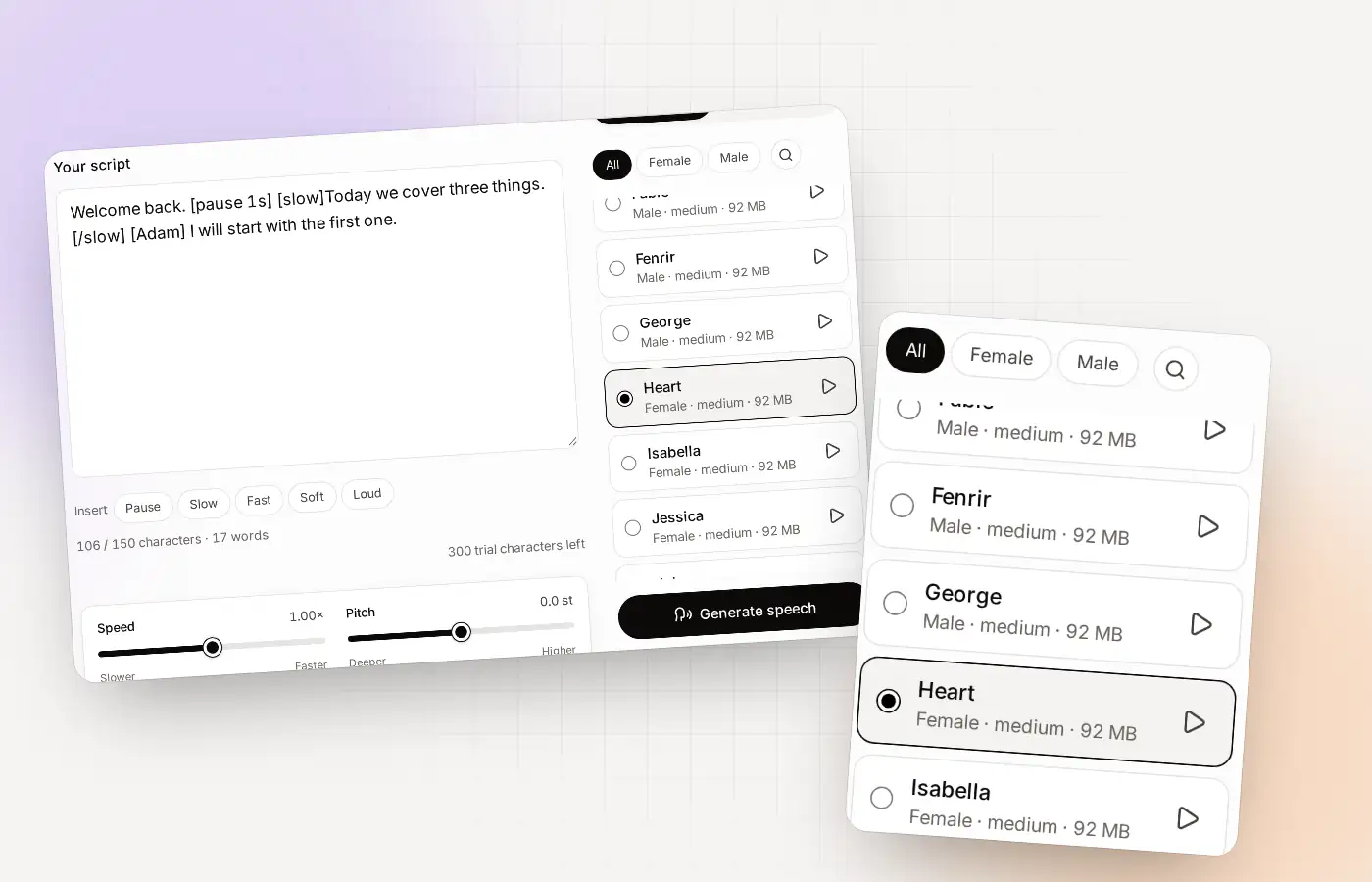
You do not need to learn anything to use it. The Studio is one page, and the whole job is three moves. Write your text, choose a voice, press the button.
Paste or type your script
Click into the script box and paste your text. The counter under it shows your characters and words.
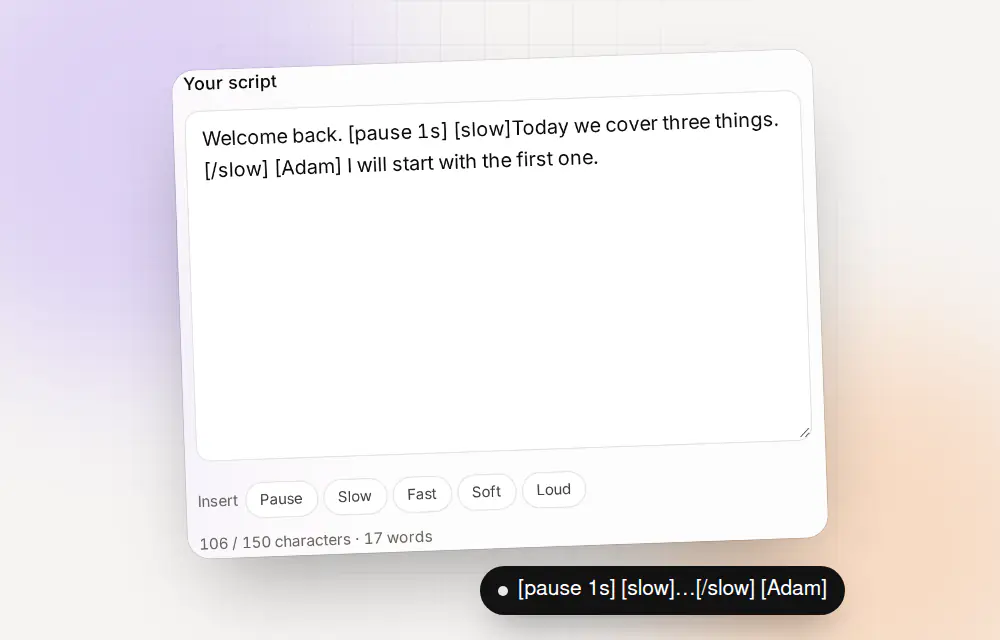
Tags go right inside your script. The buttons insert them for you. Pick a voice
Use the All, Female and Male filters, press the play arrow on a voice to hear it, then select it. The Studio shows how big each voice’s download is.
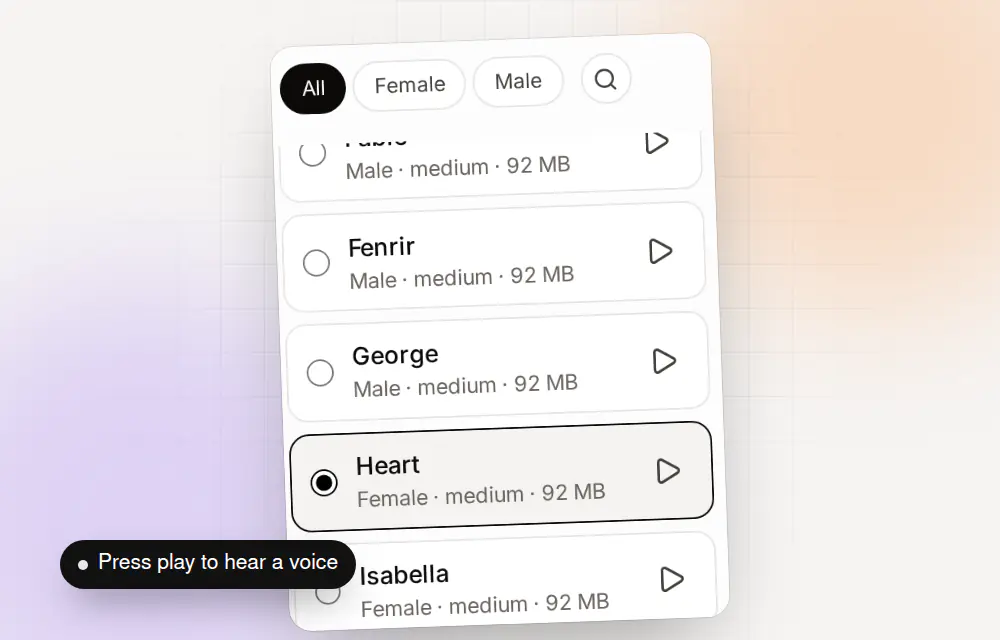
Filter the voices, press play to hear one, and pick it. Press Generate speech
Your browser makes the audio. When it is ready it appears in your History, where you can play it and download it as MP3 or WAV.
The first time you use a voice, Clonylab downloads its files and your browser keeps them. Later voice-overs with the same voice start straight away.
The controls that change how it sounds
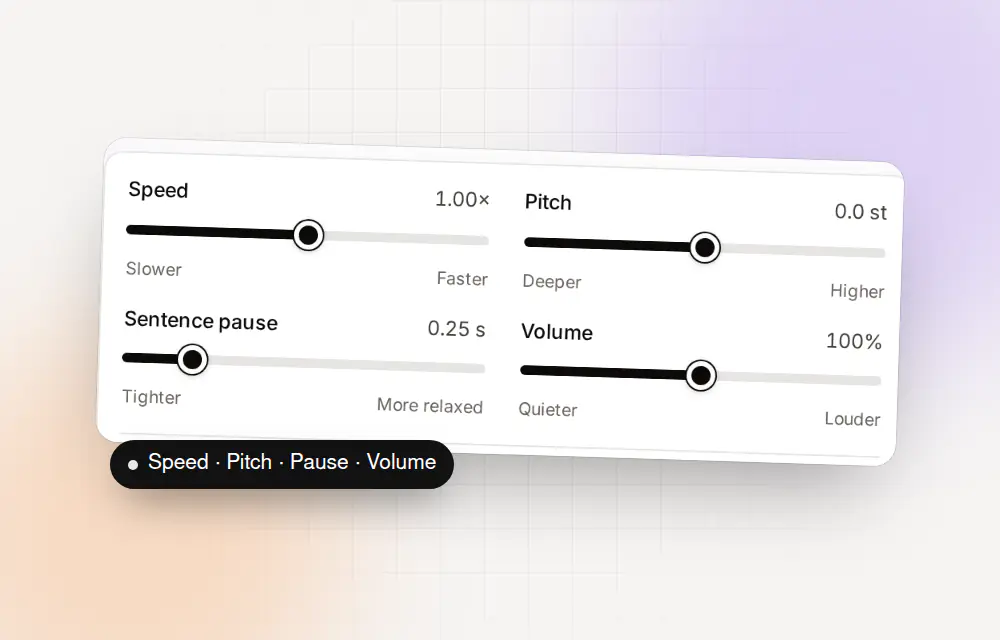
Plain text sounds fine. If you want it to sound better, you have two kinds of controls. Sliders change the whole script. Tags change one part of it.
| Control | What it changes | Where |
|---|---|---|
| Speed | How fast the voice speaks, the whole script | Slider |
| Pitch | How high or low the voice sounds | Slider |
| Sentence pause | The gap between sentences | Slider |
| Volume | How loud the audio is | Slider |
| [pause 1s] | Silence of the length you write, up to 10 seconds | Tag in the script |
| [slow] … [/slow] | Slower speech for the words in between | Tag in the script |
| [fast] … [/fast] | Faster speech for the words in between | Tag in the script |
| [soft] … [/soft] | Quieter words | Tag in the script |
| [loud] … [/loud] | Louder words | Tag in the script |
The buttons above the script box insert the tags for you. A tag that Clonylab does not know is read aloud as plain text, so a note like [sic] will not break anything. More in the text to speech with pauses page.
Choosing a voice
There are 38 standard voices, all English. 28 have a US accent and 10 a UK accent. Listen to a few before you decide, because the same script feels different in different voices.
| Group | Voices |
|---|---|
| US female (11) | Alloy, Aoede, Bella, Heart, Jessica, Kore, Nicole, Nova, River, Sarah, Sky |
| US male (9) | Adam, Echo, Eric, Fenrir, Liam, Michael, Onyx, Puck, Santa |
| US neutral (8) | Bryce, John, Kristin, LibriTTS-R, LibriTTS, LJSpeech (high), LJSpeech (medium), Norman |
| UK female (4) | Alice, Emma, Isabella, Lily |
| UK male (4) | Daniel, Fable, George, Lewis |
| UK neutral (2) | Cori (high), Cori (medium) |
Want to hear them all before you sign up? The standard voices page has a sample of every voice. For accents, see British text to speech and American text to speech.
Why it runs in your own browser
Most online text to speech tools send your text to a server and send audio back. Clonylab runs the voice in your browser. That has three effects you can feel.
- Your text stays with you. Scripts, audio and history are processed and stored in your browser, not uploaded.
- No queue. Your own browser does the work, so you are not waiting behind other people.
- You can run many at once. Every voice-over you start is its own task, and you can keep writing while the others finish.
Speed depends on your computer. Clonylab uses your graphics card when it passes a one-time test and your processor otherwise, and the badge at the top of the app shows which one is in use.
What to know before you start
| Topic | The honest answer |
|---|---|
| Language | English only |
| Account | Required, free to create, no card |
| Free allowance | 300 characters, one time, up to 150 per script |
| Paid plans | Pro and Team remove the limits |
| Sharing on the free plan | Credit “Made with Clonylab” |
| First use of a voice | Downloads that voice’s files once |
If you want the full list of what is free, read free text to speech. If you want to know about licences for business use, see text to speech for commercial use.
A first session, step by step
If you like to know what you are in for, this is what a first session looks like.
| Step | What you do | What you see |
|---|---|---|
| 1 | Sign up and confirm your email | The Studio opens |
| 2 | Paste a short script | A counter shows characters and words |
| 3 | Pick a voice and press its play arrow | A short sample plays. The first time, the voice’s files download |
| 4 | Press Generate speech | A task appears with a progress bar |
| 5 | Open History when it is done | Your voice-over, with play and download buttons |
On the free plan, keep each script to 150 characters or fewer. The counter turns into a reminder when you reach the limit.
Making many voice-overs at once
Every voice-over you start becomes its own task that runs in your browser in the background. The Generate button is free again straight away, so you can queue the next script. You can also move between the Studio, Voices and Clone pages while tasks keep running.
- Watch every task. Each has its own progress, so you always know what is ready.
- Finished work saves itself. Completed voice-overs land in your History.
- Close nothing in the middle. Keep the tab open until tasks finish, because the audio is made in your browser.
- Intro scriptMakingDone · saved to History
- Chapter 1MakingDone · saved to History
- Chapter 2MakingDone · saved to History
If something doesn’t work
| What happens | Why | What to try |
|---|---|---|
| Generate speech is greyed out | The script box is empty, or the trial characters are used | Type a script, or check the characters left under the box |
| The first voice-over is slow | The voice files are downloading, or your computer is using its processor | Wait for the download. The next one is faster |
| The script stops at a limit | The free plan allows 150 characters per script | Shorten the script, or move to Pro |
| Nothing plays | The browser blocked audio, or the volume is low | Press play again, and check the volume slider and your device volume |
| The badge says CPU | The graphics card has not passed the one-time test, or is unavailable | It still works, only slower. The test runs by itself after a voice-over |
Still stuck? Use the chat button, or write to us from the contact page. It helps to tell us which voice you used and your browser.
Tips for a smoother first run
- Use a recent browser. Clonylab runs in your browser, so an up-to-date one helps.
- Keep the tab open while it works. The audio is made in your browser.
- Start with one voice. Downloading many voices at once takes longer.
- Watch the badge at the top. It shows whether your graphics card or your processor is in use.
Where to go next
- Direct the reading with the AI voiceover generator.
- Pick a voice with the AI voice generator.
- Keep your files with text to speech MP3.
Questions about text to speech online
How do I use text to speech online with Clonylab?
Make a free account, open the Studio, paste your text, pick a voice and press Generate speech. When it is ready, play it or download it as MP3 or WAV from your History.
Is Clonylab text to speech free?
You can start free: a Trial account has a one-time allowance of 300 characters and up to 150 characters per script. Pro and Team have no limits.
Do I need to download anything?
No app is needed. The first time you use a voice, your browser downloads that voice’s files, and keeps them for next time.
Which voices are available?
38 standard English voices: 28 US and 10 UK, female, male and neutral, plus voices you have cloned yourself.
Is my text uploaded?
No. Your scripts, audio and history are processed and stored in your browser only.
Can I download the audio?
Yes. Every voice-over can be downloaded as MP3 or WAV.
Does it work in other languages?
No. Clonylab is English only.
Turn your text into speech
Make a free account, paste a script and press Generate speech.
Sources and further reading
- Speech synthesis (Wikipedia) · A plain overview of how computers turn text into speech.
- Kokoro-82M model card (Hugging Face) · The voice model Clonylab’s standard voices run on, with its Apache 2.0 licence.
Written and checked by the Clonylab team. Last updated . The screenshots were taken from the Clonylab app on that date. Read how we work on the About page, or contact us if something on this page is wrong. See also the Terms, Privacy policy and Voice licences.