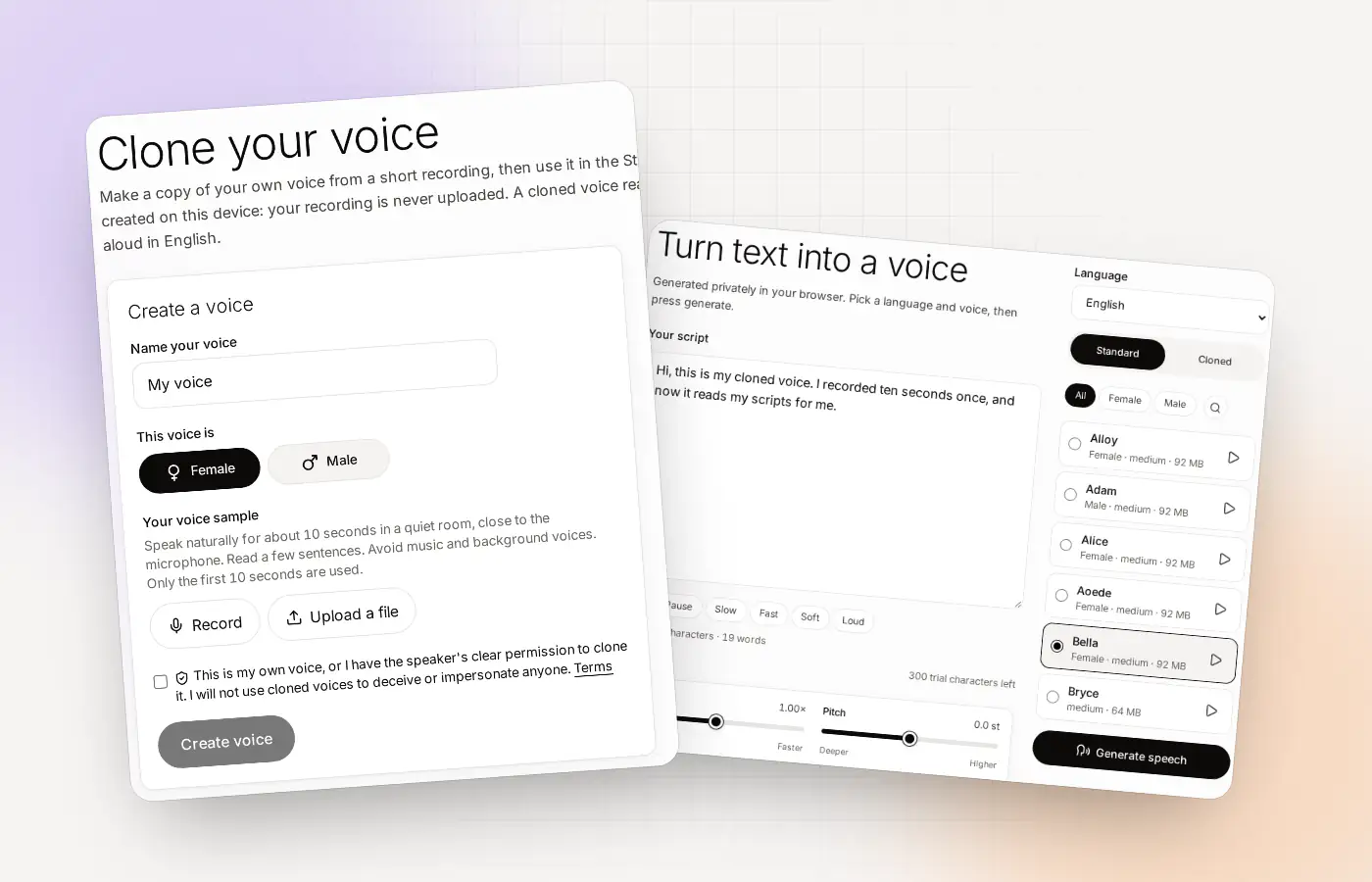
Cloning your voice at a glance
| What you need | A computer with a modern browser and a microphone (or a clean recording you already have) |
|---|---|
| How long to record | About 10 seconds. At least 3 seconds of speech is needed, and 8 to 10 sounds most like you |
| What you do | Record or upload, name the voice, choose Female or Male, confirm it is yours, press Create voice |
| Where it happens | In your browser |
| Then | Pick Cloned in the Studio, type English text and press Generate speech |
| Cost to start | Free, up to 3 cloned voices |
Before you press Record
You can clone your voice in a few minutes, and a little setup makes the result a lot better. You do not need a studio. You need a quiet room and a minute of calm.
- A quiet place. Close the window and switch off anything that hums, like a fan.
- A microphone close to your mouth. A headset or a phone headset mic is fine. Keep it about a hand’s width away.
- Your normal voice. Not your “recording voice”, and not a whisper. Speak the way you would to a friend.
- A free account. The free trial lets you clone up to 3 voices. See free voice cloning for the limits.
What to read for your sample
Many people freeze at “say something”. Here is a short passage you can read out loud at a relaxed pace. It takes about ten seconds and has a mix of sounds.
Read it as if you were telling a friend, not performing. If you stumble, stop and start again. Only the first 10 seconds are used, so a clean start matters most.
The steps, one by one
Open Clone and record or upload
Press Record, read your sample and press Stop. Or press Upload a file and choose a recording you already have. Clonylab tells you how many seconds of speech it found.
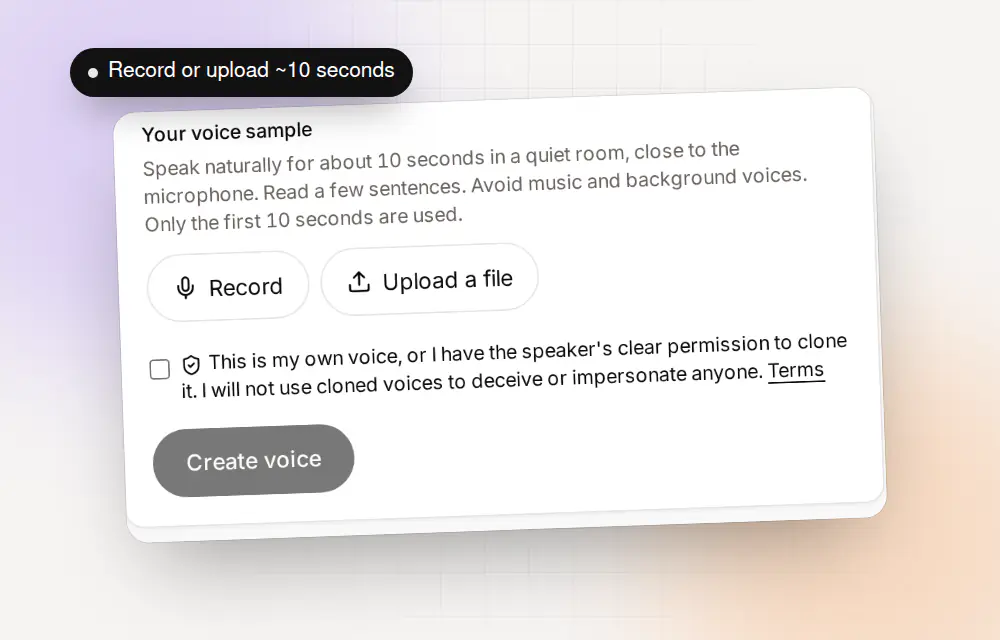
Record in the browser or upload a file. The first 10 seconds are used. Name it and choose Female or Male
A clear name helps later, such as “My narration voice”. The choice of Female or Male helps Clonylab build the voice.
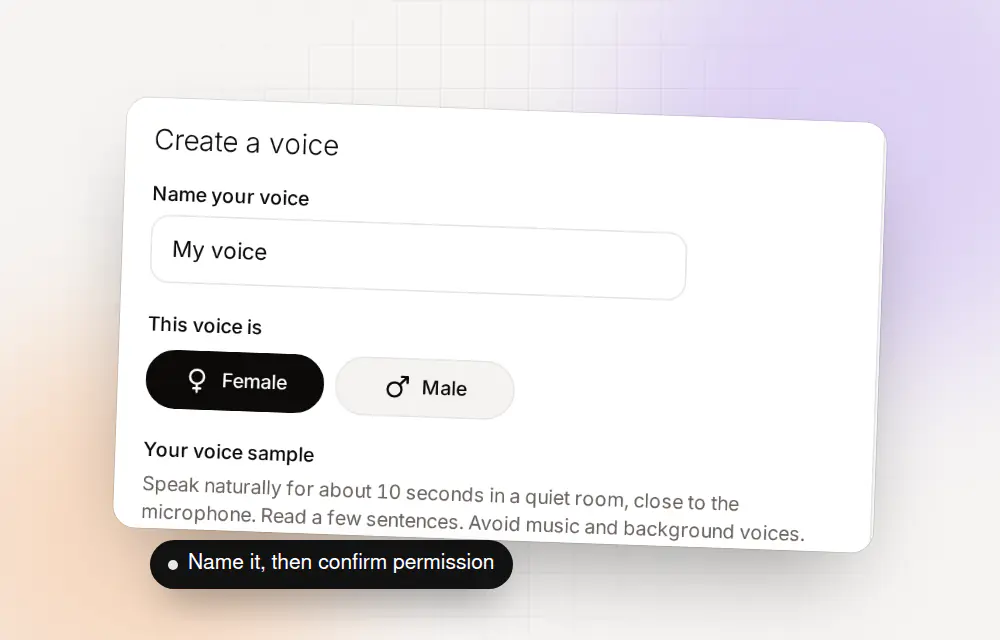
A name, a choice of Female or Male, and your confirmation. Confirm and create
Tick the box to say that the voice is yours, or that the speaker has clearly and lawfully allowed it. Then press Create voice. The first time, Clonylab downloads the model files it needs.
Test it in the Studio
Open the Studio, switch to Cloned, pick your voice and type a short line. Press Generate speech.
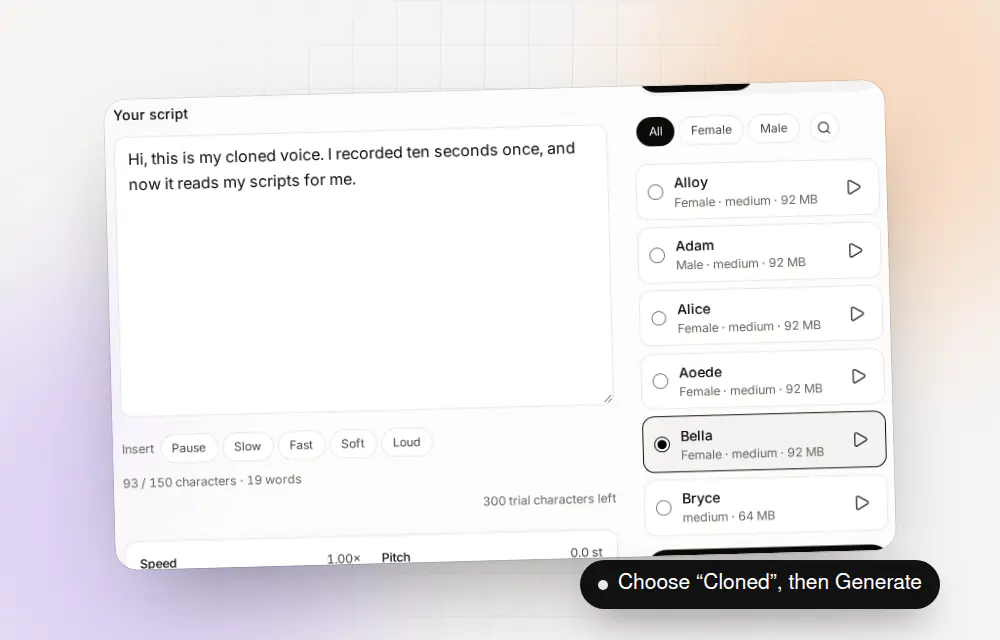
Choose a voice and press Generate speech.
How to test your clone
A clone can sound fine on one sentence and odd on another. Test it with a few kinds of lines before you rely on it.
| Test | Write something like | Listen for |
|---|---|---|
| A plain sentence | I will send the files tomorrow morning. | Does it sound like you? |
| A question | Can you hear me clearly from there? | Does the pitch rise naturally? |
| Numbers and names | Call me on 555 0100 or email Priya. | Are they said clearly? |
| A longer line | A sentence with a comma, a clause and a clear ending. | Is the pace steady? |
In the Studio you can also change the speed, pitch, sentence pause and volume, and add tags such as [pause 1s] inside the script. The AI voiceover generator page explains them.
If it doesn’t sound right
| What you hear | Most likely cause | What to try |
|---|---|---|
| Hiss or room echo | Noise in the sample | Record again in a quieter, softer room, such as one with curtains |
| Muffled or distant | Microphone too far away | Move the microphone closer, about a hand’s width |
| Flat or robotic | Reading too carefully | Speak more like you are talking to a friend |
| Sounds like someone else | Wrong choice or a noisy start | Check Female or Male, and start your sample with clear speech |
| “Only a few seconds found” | Too short or too quiet | Record at least 3 seconds of speech, ideally 8 to 10 |
Trial accounts can keep up to 3 cloned voices, so there is room to try again.
Keep your clone safe
Your cloned voice lives in your browser, not on our servers. That is good for privacy, and it has one consequence. If you clear your browser’s site data, the clone goes with it. Keep your original recording in a folder you trust, and you can make the voice again whenever you need it. The page on private voice cloning explains what is stored where.
Clone only your own voice, or a voice whose speaker has clearly said yes. The Terms forbid impersonation and deception.
Three people, three kinds of clone
The same steps give different results for different jobs. Here is how three kinds of people might use a clone, with a first test line for each.
| Who | What they make | First test line | Settings to try |
|---|---|---|---|
| A YouTube creator | Intros and narration for explainer videos | Welcome back to the channel. [pause 1s] Today we look at one simple idea. | Speed 1.0, one [pause] at the start |
| A teacher | A short lesson introduction | In this lesson, you will learn three things. | Speed a little slower, longer sentence pause |
| A small business owner | A phone-style greeting for a video | Thanks for visiting. Here is how we can help you today. | Normal speed, warm and steady |
Every test line above is under 150 characters, so it works on the free plan.
Record now, or upload something you already have?
Both ways lead to the same clone. Which one is better depends on what you have.
| Record in the browser | Upload a file | |
|---|---|---|
| Best when | You have a microphone and a quiet minute | You already have a clean recording of yourself |
| What to watch | Room noise, distance from the microphone | Music, other voices, long silences at the start |
| Length | About 10 seconds is enough | The first 10 seconds of speech are used |
| Permission | It is your voice | Make sure you have the right to use it |
If you upload a recording from a call or a video, check that nothing else is in the first 10 seconds. A second voice or a burst of music is copied into the result.
How to make your next clone better
Your first clone is a draft. If you want a better one, change one thing at a time so you can hear what helped.
- Change the room. A small room with soft things in it, such as a wardrobe full of clothes, deadens echo.
- Change the distance. Move the microphone closer, to about a hand’s width, and speak across it, not into it.
- Change the delivery. Speak a little slower and with a bit more energy than feels natural.
- Change the start. Begin your sample with clear speech, not a cough or a long breath.
You can keep up to three clones on the free plan, so you can compare them side by side in the Studio, then keep the best one. The first page in this series, voice clone online, has a table of recording tips too.
Where to go next
- Check the limits of the free plan on the free voice cloning page.
- Direct the reading with the AI voiceover generator.
- Understand privacy on the private voice cloning page.
Questions about cloning your own voice
How do I clone my voice?
Open Clone, record about 10 seconds or upload a recording, name the voice, choose Female or Male, confirm it is yours and press Create voice. Then use it in the Studio under Cloned.
How long should my recording be?
About 10 seconds. Clonylab needs at least 3 seconds of speech and uses the first 10. Eight to ten seconds sounds most like you.
What should I say in the recording?
Anything natural. A few ordinary sentences read at a relaxed pace work well. Avoid music and other voices.
Do I need a good microphone?
No. A headset or phone headset microphone close to your mouth in a quiet room is enough. A quiet room matters more than expensive gear.
Can I clone my voice from a file?
Yes. Press Upload a file and choose a clean recording. The first 10 seconds of speech are used.
Is it free to clone my voice?
You can clone up to 3 voices free with a Trial account. Pro and Team have no limit on cloned voices.
Where is my cloned voice saved?
In your browser. Clearing your site data removes it, so keep your original recording.
Clone your voice now
Find a quiet spot, read the sample from this page and hear your clone in a few minutes.
Sources and further reading
- getUserMedia() (MDN Web Docs) · How a page asks for your microphone, and why the browser asks you first.
- MediaRecorder API (MDN Web Docs) · How a browser records audio from your microphone.
Written and checked by the Clonylab team. Last updated . The screenshots were taken from the Clonylab app on that date. Read how we work on the About page, or contact us if something on this page is wrong. See also the Terms, Privacy policy and Voice licences.