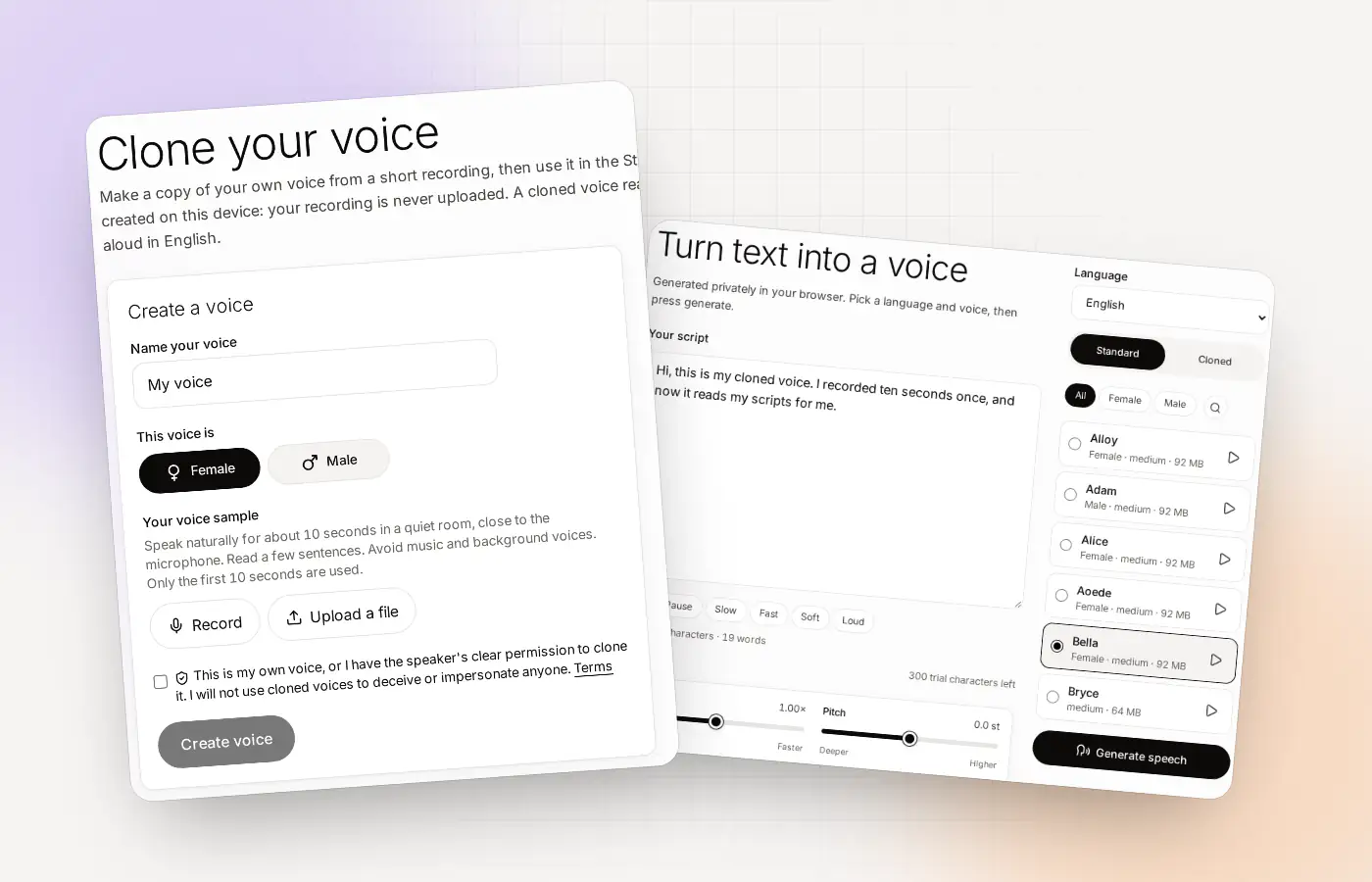
The Clonylab voice cloner at a glance
| What it does | Builds a copy of your voice from about 10 seconds of speech |
|---|---|
| Where it runs | In your browser, on your graphics card or processor |
| What you give it | A short recording (record it or upload a file) |
| What you get | A cloned voice for English text, with MP3 and WAV downloads |
| Language | English only |
| Free tier | Up to 3 cloned voices and 300 characters, no card |
| Paid | Pro and Team: unlimited cloned voices and characters |
What an AI voice cloner actually does
An AI voice cloner listens to a short recording of someone speaking and learns what makes that voice sound the way it does: the pitch, the tone, the way sounds are shaped. Afterwards it can read any text in that voice.
It does not play your recording back, and it does not stitch your words together. It builds a voice that says new sentences. How close it gets depends on the cloner and on your sample. A clear recording in a quiet room gives the best result.
| Voice cloner | Standard text to speech | |
|---|---|---|
| Whose voice is it? | Yours, or a voice you have permission to clone | A premade voice |
| What you provide | A short recording | Nothing but text |
| Best for | Content that should sound like you | Quick voice-overs in a neutral voice |
| In Clonylab | Voice clone online | Text to speech online |
Ten questions to ask any AI voice cloner
Before you give a voice cloner your voice, ask it these. They are fair questions for any tool, and here are the answers for Clonylab.
| Question | Clonylab’s answer |
|---|---|
| Is my recording uploaded? | No. The clone is built in your browser, and we never receive the recording. |
| Where is the cloned voice stored? | In your browser, not on our servers. |
| Do I need an account? | Yes. It is free to create, with no card. |
| What does it cost? | Free for up to 3 clones. Pro and Team are paid and unlimited. |
| Is there a queue? | No, because your own browser does the work. Speed depends on your computer. |
| Which languages work? | English only. |
| Can someone clone another person’s voice with it? | Only with the speaker’s clear, lawful permission. You confirm this before every clone, and the Terms forbid impersonation. |
| Can I download the audio? | Yes, as MP3 or WAV. |
| Can I use the audio commercially? | The standard voices are licensed for commercial use. You are responsible for what you make with a cloned voice. See the Terms and Voice licences. |
| Can I delete my data? | Yes. Clear your history, and delete your account from the account page. |
Why it matters that the cloner runs in your browser
Running in your browser changes three things you will notice.
- Privacy. Your recording does not leave your computer to be processed. The private voice cloning page lists what is stored where.
- No waiting in line. A cloud cloner shares its servers with everyone. In your browser, only you are using it.
- Cost. There is no server bill for heavy work, which is one reason a free tier can exist.
There is a trade-off, and we would rather you hear it from us. The first time you use a voice, Clonylab downloads the model files, and your browser keeps them. A slow computer makes voice-overs take longer. Clonylab uses your graphics card when it passes a quick one-time test, and your processor otherwise. You can see which one in the badge at the top of the app.
How the Clonylab cloner works in three moves
Give it a short sample
Record about 10 seconds in your browser or upload a file. At least 3 seconds of speech is needed.
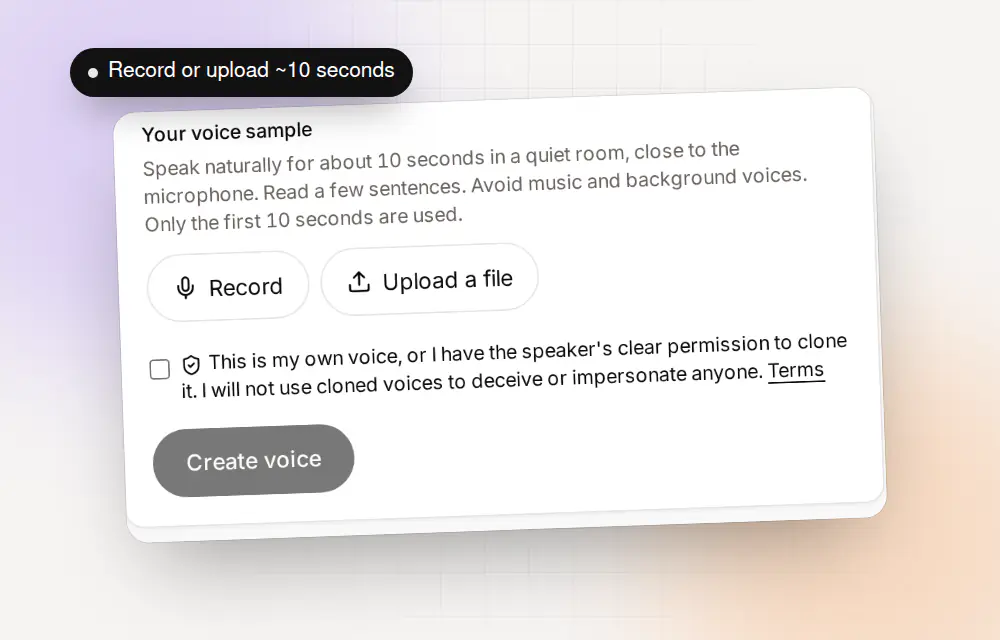
Record in the browser or upload a file. The first 10 seconds are used. Name it and confirm
Name the voice, choose Female or Male and confirm that it is yours or that you have permission.
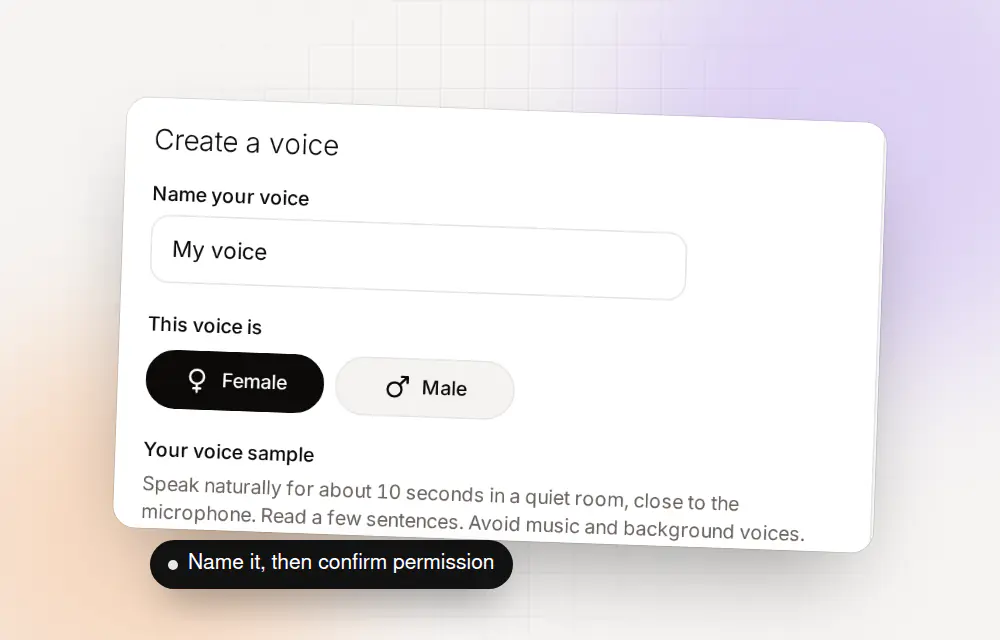
A name, a choice of Female or Male, and your confirmation. Use it on any English script
Pick Cloned in the Studio, type or paste your script and press Generate speech.
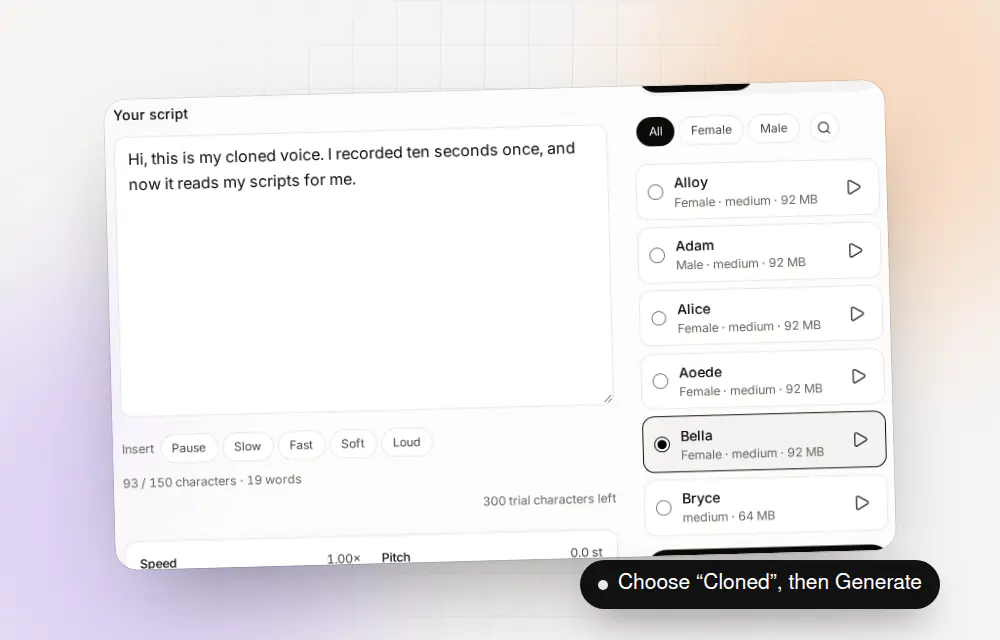
Choose a voice and press Generate speech.
What a voice cloner is good for, and where it isn’t
| Good fit | Not a good fit |
|---|---|
| Narration for videos in your own voice | A language other than English |
| Podcast intros and sponsor reads | Copying a voice without permission |
| Course lessons you update later | Long recordings you want to match exactly, word for word |
| Training videos with a steady voice | Situations where the listener must be sure it is a live person |
Cloned speech is generated. If your listeners could be misled into thinking a real person spoke live, say that it is generated. The Terms ask you not to present generated speech as a real recording of a real person.
- Good fit
- Narration for videos in your own voice
- Podcast intros and sponsor reads
- Course lessons you update later
- Training videos with a steady voice
- Not a good fit
- A language other than English
- Copying a voice without permission
- Matching a long recording word for word
- Anywhere listeners must be sure it is live
What to expect from your first clone
Here is the order of things, so nothing surprises you.
| Stage | What happens | Why it takes a moment |
|---|---|---|
| Account | You sign up and confirm your email | One time only |
| Record | You record or upload about 10 seconds | Clonylab tells you how many seconds of speech it found |
| First download | Your browser downloads the voice engine’s files | Only the first time. Your browser keeps them |
| Create voice | Your browser builds the clone | Faster on a graphics card, slower on a processor |
| Test | You pick Cloned in the Studio and generate a line | Voice files for generating can also download the first time |
A slow first run is normal. After the downloads, the same steps are much quicker, and a downloaded voice can generate again instantly and offline.
Who the Clonylab voice cloner suits
| If you… | Clonylab is… |
|---|---|
| Care where your voice recording goes | A good fit. The clone is built in your browser |
| Make English videos, podcasts or courses | A good fit. Voice-overs in your own voice, with MP3 and WAV |
| Want to try cloning before paying | A good fit. Three free clones, no card |
| Need other languages | Not a fit. Clonylab is English only |
| Need hundreds of voices to choose from | Partly. There are 38 standard voices plus any clones you make |
| Want an AI app to make speech for you | A fit with Pro or Team. The AI connection can use your voices, but it cannot create a clone |
The AI connection is covered in the page on text to speech for teams and on the pricing page.
An honest word about quality
A clone is a copy, not a recording of you. It gets the sound of your voice, and it reads new text in its own way. Sometimes the stress falls where you would not put it. Sometimes a name is read oddly. That is normal for any voice cloner, and it is why we suggest testing a few lines before you rely on it.
Two habits help. First, spell hard words the way they sound. Second, add pauses and pace tags, such as [pause 1s] and [slow], to shape the reading. You will find them on the AI voiceover generator page.
Where to go next
- Make your first clone on the voice clone online page.
- See what is stored where on the private voice cloning page.
- Know the limits on the free voice cloning page.
Questions about AI voice cloners
What is an AI voice cloner?
A tool that learns a voice from a short recording and then reads any text in that voice. Clonylab’s cloner builds the voice in your browser.
Is Clonylab a safe AI voice cloner?
Your recording is never uploaded, the clone is stored in your browser, and you confirm permission before every clone. The Privacy policy lists what we do store, such as your email and usage numbers.
How much audio does the cloner need?
About 10 seconds. At least 3 seconds of speech is needed, and the first 10 seconds are used.
Is there a free AI voice cloner?
Clonylab’s free Trial plan lets you clone up to 3 voices and generate with a one-time allowance of 300 characters. No card is needed.
Does the cloner work offline?
Once a voice’s files are downloaded, the app lets you generate with it again instantly and offline. Your account and plan still come from our servers.
Can the cloner copy any voice?
Only your own voice or a voice with the speaker’s clear, lawful permission. The Terms forbid impersonation and deception.
Which languages does it support?
English only.
Try the cloner yourself
Record about 10 seconds and hear your clone read a line. Free to start, no card needed.
Sources and further reading
- WebAssembly (MDN Web Docs) · How a browser runs a model on your own processor.
- MediaRecorder API (MDN Web Docs) · How a browser records audio from your microphone.
Written and checked by the Clonylab team. Last updated . The screenshots were taken from the Clonylab app on that date. Read how we work on the About page, or contact us if something on this page is wrong. See also the Terms, Privacy policy and Voice licences.