
The short answer
To add text to speech to Cline, create a token on Clonylab’s Connector screen, open Cline’s MCP settings and add a clonylab entry with type streamableHttp, the url https://clonylab.com/mcp and an Authorization header. Cline then gets 14 voice tools. Keep your Clonylab tab open. It needs Pro or Team.
Key takeaways
- Add a clonylab entry to Cline’s MCP settings with type streamableHttp, url https://clonylab.com/mcp and an Authorization header.
- Do not leave out the type line. Without it Cline uses the older SSE style and will not connect.
- Use autoApprove for read-only tools only, and keep approval on for delete_history.
- The voice-over is made in your open Clonylab tab, so keep it open with the browser switch on.
- The AI connection is part of Pro and Team. It is English only, and Cline cannot create a cloned voice.
01What you get with Cline text to speech
Cline is an open-source coding agent that lives inside your editor. It plans, edits files, runs commands and asks for your approval at each step. With MCP it can also use outside tools. Add Clonylab as a server and Cline can turn a script into a voice-over, then save the MP3 where you tell it.
Cline is built around approvals. That fits a tool that can start voice-overs and delete History items. You decide which Clonylab tools run on their own and which ones wait for your click. This guide shows how to set that up well.
Clonylab gives Cline 14 tools for voices, speech jobs, History, Studio settings and usage. Our guide to the text to speech MCP server explains each one. This page covers the Cline side: the settings file, the one field you must not forget, and a sensible auto-approve list.
02Before you start
| Need | Details |
|---|---|
| Cline | Installed in your editor and set up with a model |
| A Clonylab plan | The AI connection is part of Pro and Team |
| A token | Made on the Connector screen. It starts with swr_ and is shown once |
| An open Clonylab tab | Voices are made in your browser tab, so keep it open |
03Add Clonylab to Cline in 4 steps
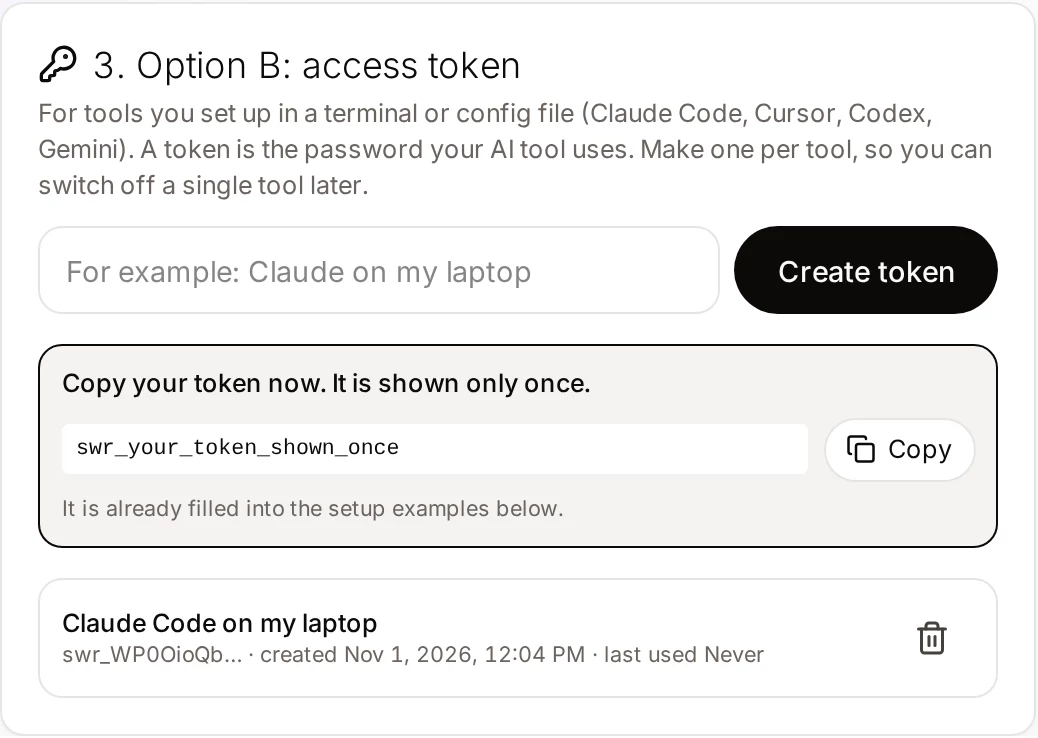
Create a token
Open Connector in Clonylab, name a token “Cline on my laptop” and copy it.
Open the MCP settings in Cline
In the Cline panel click the MCP Servers icon in the top toolbar, the one that looks like stacked servers. Open the Configure tab, then press Configure MCP Servers. This opens the settings JSON, where you add servers under mcpServers.
Paste the block
Add this entry. The type line matters, and the next section explains why.
{
  "mcpServers": {
    "clonylab": {
      "type": "streamableHttp",
      "url": "https://clonylab.com/mcp",
      "headers": {
        "Authorization": "Bearer YOUR_TOKEN"
      },
      "disabled": false,
      "autoApprove": []
    }
  }
}
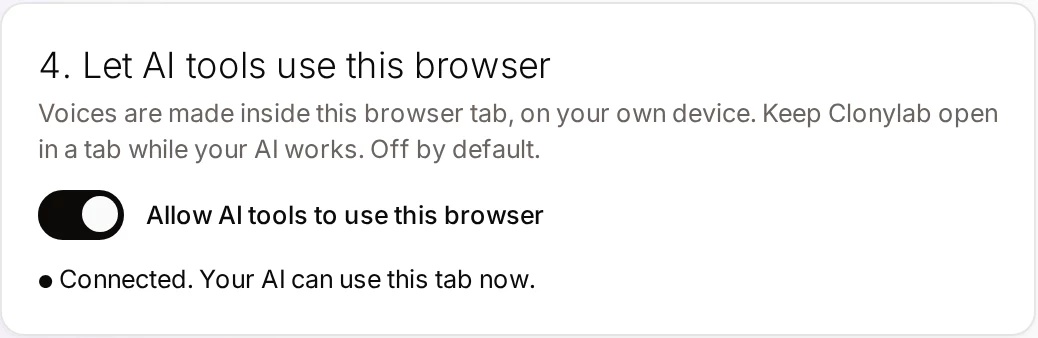
Allow your browser tab
Switch on Allow AI tools to use this browser in Clonylab and keep the tab open.
04The line you must not forget: type
Cline’s documentation says to set "type": "streamableHttp" explicitly. If you leave it out, Cline falls back to the older SSE style. Clonylab’s server speaks Streamable HTTP, so an entry without the type line will not connect. If a server shows an error right after you add it, check this line first.
When you use the Cline command-line tool, the same settings live in ~/.cline/data/settings/cline_mcp_settings.json. You can move that file by setting the CLINE_MCP_SETTINGS_PATH environment variable. The editor extensions use the file that the Configure button opens.
05Choose what Cline may do without asking
autoApprove is a list of tool names that run without your click. Cline’s documentation advises keeping it to safe tools. For Clonylab, that means the read-only tools. They only look at things.
| Tool | What it does | Auto-approve? |
|---|---|---|
connection_status | Checks that your tab is connected | Yes |
list_voices | Lists the standard voices | Yes |
list_cloned_voices | Lists your cloned voices | Yes |
get_job | Checks the progress of a job | Yes |
usage_summary | Shows characters and minutes used | Yes |
generate_speech | Starts a voice-over | Your choice. Keep it on approval until you trust your prompts |
delete_history | Deletes voice-overs for good | No |
set_studio_settings | Changes your Studio settings | No |
"autoApprove": ["connection_status", "list_voices", "list_cloned_voices", "get_job", "usage_summary"]06Your first voice-over from Cline
Check that Clonylab is connected and list five UK female voices.Uses connection_status and list_voices.
Read CHANGELOG.md, write a 30-second spoken summary of the newest release and make the voice-over in a calm US male voice. Save it as release.mp3.Uses generate_speech, get_job and get_audio, then a download command.
Make that again slower, with a pause after each bullet.Sets the speed and adds [pause 1s] tags.
List my last five voice-overs. Do not delete anything.Uses list_history.
Cline’s approval step is the main reason to like it for this job. Each Clonylab call shows up as a request you can read before you accept. For the first week, approve every generate_speech call by hand and look at three things.
- The text. Is it what you want spoken, with nothing private in it?
- The voice. Did Cline pick the voice you named, or a default?
- The tags. Are the pauses where you expect them?
Once your prompts are steady, you can move generate_speech into autoApprove and keep deletes and settings changes on approval. If you want to pause Clonylab without losing the entry, set "disabled": true. The server stays in the file and Cline stops loading it. Switch it back to false when you need it.
Cline works in the editor and also as a command-line tool. Both can use Clonylab, and both read the same kind of block. The command-line tool keeps its settings in its own file, which we named above, so remember to add Clonylab in each place you use Cline.
07Keep your token safe
If a token leaks, delete it on the Connector screen. Cline loses access at once, and you can make a new token in a few seconds.
08If something goes wrong
| What you see | Likely cause | What to do |
|---|---|---|
| The server shows an error after adding it | The type line is missing, so Cline uses SSE | Add "type": "streamableHttp" |
| No tools appear | The server is disabled, or the JSON has an error | Set disabled to false and check the commas |
| Unauthorized | The token was deleted or mistyped | Create a new token and update the file |
| Cline says no browser tab is connected | Clonylab is closed or the switch is off | Open Clonylab and switch on “Allow AI tools to use this browser” |
| A long voice-over times out | The request timeout is shorter than the job | Raise the MCP timeout in Cline’s settings, or ask Cline to run get_job |
We took the menu route, the type rule and the file paths from Cline’s documentation on 1 November 2026, and the Clonylab values from our Connector screen. We did not run every Cline version. If a label differs, look for “MCP Servers” and “Configure” in the Cline panel.
09Limits, and when to use the Studio
| Topic | What to know |
|---|---|
| Plan | Pro or Team |
| Language | English only, with US and UK voices |
| One request | Up to 10,000 characters per generate_speech call |
| Browser | The Clonylab tab must stay open |
| Cloned voices | Cline can use your clones, not create them. See voice clone MCP |
| Download links | An MP3 link works for 30 minutes |
Cline sends your request to the model you chose, and that model decides when to call a tool. A smaller model may need clearer instructions, such as naming the tool or the voice. If a call fails once, ask Cline to read the error and try again. Most failures come from a closed Clonylab tab, and the error text says so in plain words.
The Studio stays the best place for one clip that you want to hear and tune by ear. Cline fits when a voice-over comes out of a bigger task in your editor. If you use another agent too, see our guides for Windsurf and AI agents. The AI voiceover generator page lists every script tag.
10Questions and answers
How do I add an MCP server to Cline?
Click the MCP Servers icon in the Cline panel, open the Configure tab and press Configure MCP Servers. Add an entry under mcpServers. For Clonylab use type streamableHttp, the url https://clonylab.com/mcp and an Authorization header.
Why does my server not connect?
The most common cause is a missing type line. Cline’s documentation says that leaving type out makes Cline use the older SSE style, so set "type": "streamableHttp".
What should I put in autoApprove?
Only safe, read-only tools such as connection_status, list_voices, list_cloned_voices, get_job and usage_summary. Keep approval on for delete_history and set_studio_settings.
Do I have to keep Clonylab open?
Yes. The voice-over is made in your open Clonylab browser tab on your own device. Keep the tab open and the browser switch on.
Can Cline clone my voice?
No. You create a clone yourself on the Clone screen. After that Cline can list your cloned voices and use them to read English scripts.
Is it free?
The free trial lets you try the Studio and cloning. The AI connection that Cline uses is part of the Pro and Team plans.
Ready to let your AI make the voice-overs?
Start free with the Studio and cloning, then add Pro when you want the AI connection. English only, no card to start.
Keep reading
Sources and further reading
- Configuring MCP servers (Cline docs) · The Configure MCP Servers route, the streamableHttp type, headers and autoApprove.
- Model Context Protocol: introduction · The official explanation of MCP and what it is for.
- Model Context Protocol specification · The rules that AI apps and servers follow, including the HTTP transport.
- Model Context Protocol (Wikipedia) · A neutral overview of how MCP began and how it is used.
Last updated . The screenshots come from the Clonylab Connector screen, with the address and the token replaced by the real address and a placeholder. App and tool settings change often: if a step does not match your version, trust the Connector screen in your account.