
The short answer
To add text to speech to Windsurf, create a token on Clonylab’s Connector screen, open Cascade’s MCP config file and add a clonylab entry with serverUrl set to https://clonylab.com/mcp and an Authorization header. Cascade then gets 14 voice tools. Keep your Clonylab tab open. It needs Pro or Team.
Key takeaways
- Open Cascade’s MCP config file and add a clonylab entry with serverUrl https://clonylab.com/mcp and an Authorization header.
- The menu route opens the right file for your version, so you do not need to know the path.
- Cascade gets 14 tools to list voices, make a voice-over, check progress and fetch the MP3.
- The voice-over is made in your open Clonylab tab, so keep it open with the browser switch on.
- The AI connection is part of Pro and Team. It is English only, and Cascade cannot create a cloned voice.
01What you get with Windsurf text to speech
Windsurf is an AI code editor, and its agent is called Cascade. Cascade writes and edits code, runs commands and, with MCP, can use outside tools. Add Clonylab as an MCP server and Cascade can also turn a script into a voice-over and save the MP3 into your project.
That opens up small jobs that used to need a detour. A README can become a spoken tour. A release note can become a clip for your team channel. A product tour script can get its narration before you record the screen. You stay in the editor the whole time.
Clonylab offers Cascade 14 tools for voices, speech jobs, History, Studio settings and usage. If you want each tool explained first, read our guide to the text to speech MCP server. This page is the Windsurf version.
02Before you start
| Need | Details |
|---|---|
| Windsurf | Installed, signed in, with Cascade available |
| A Clonylab plan | The AI connection is part of Pro and Team |
| A token | Made on the Connector screen. It starts with swr_ and is shown once |
| An open Clonylab tab | Voices are made in your browser tab, so keep it open |
Windsurf supports three kinds of MCP servers: stdio, Streamable HTTP and SSE. Clonylab is a Streamable HTTP server, so you give Windsurf an address and one header. Nothing has to be installed.
If you use Windsurf through a company plan, an admin may control which MCP servers people can add. Windsurf’s documentation describes a plugin store whitelist for Teams and Enterprise accounts. In that case, ask your admin to allow the Clonylab address, https://clonylab.com/mcp, and to say whether members may add servers by hand. Personal accounts do not have this step. A token belongs to the person who made it, so each team member should create their own.
While we wrote this guide, Windsurf’s documentation pages were redirecting to a new home on the Devin docs site, and the config file path in the text had changed. That is why the steps below open the file from inside Windsurf instead of asking you to find it by hand.
03Add Clonylab to Windsurf in 4 steps
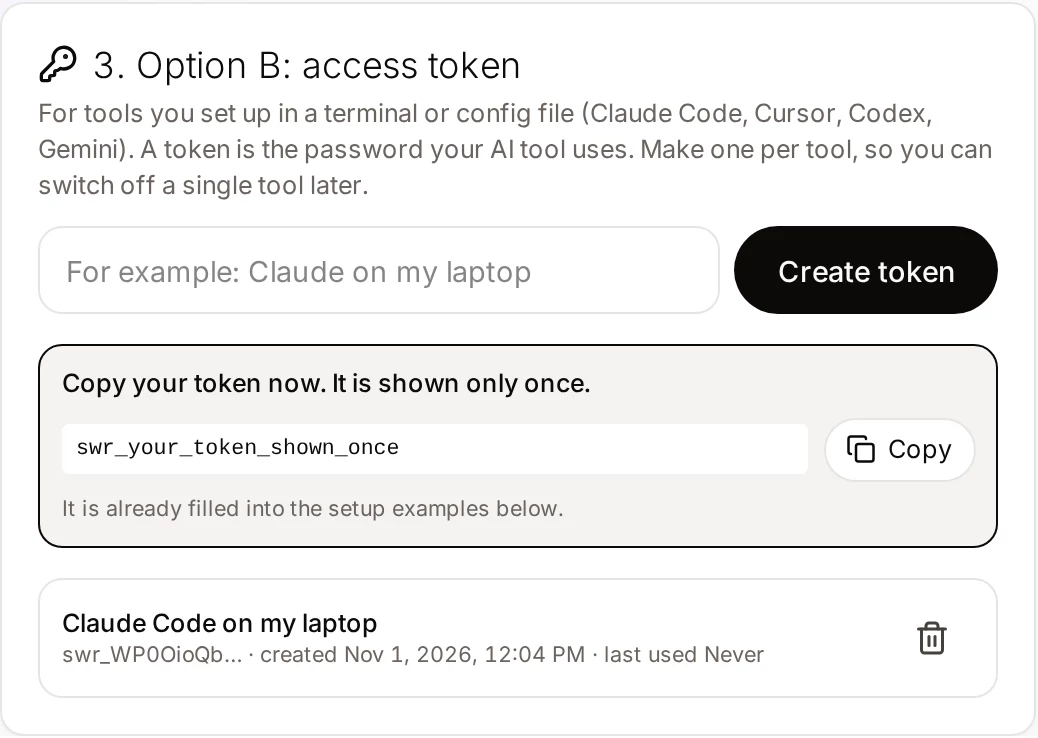
Create a token
Open Connector in Clonylab, name a token “Windsurf on my laptop” and copy it.
Open the MCP config file
Windsurf’s documentation gives two routes. In Cascade’s MCP menu choose Open MCP config file. Or go to Settings, then Tools, then Windsurf Settings, then Add Server. Both lead to a JSON file called mcp_config.json.
Paste the block
Add Clonylab under mcpServers. Remote servers use serverUrl for the address.
{
  "mcpServers": {
    "clonylab": {
      "serverUrl": "https://clonylab.com/mcp",
      "headers": {
        "Authorization": "Bearer YOUR_TOKEN"
      }
    }
  }
}
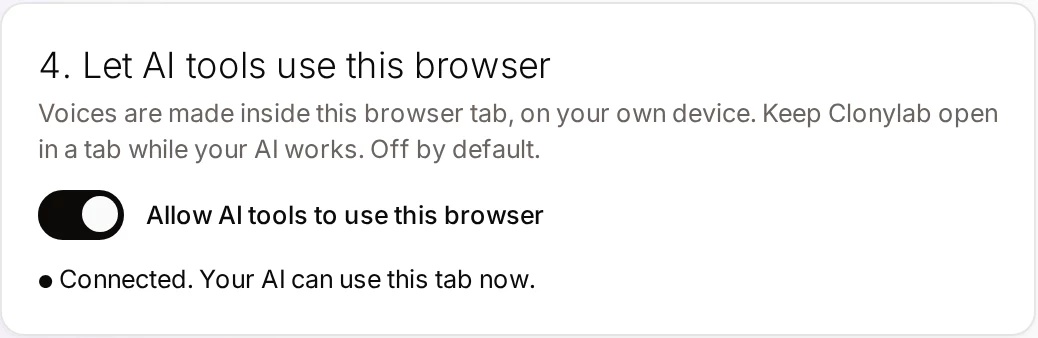
Allow your browser tab
Switch on Allow AI tools to use this browser in Clonylab and keep the tab open.
04Where the file lives
Windsurf’s current documentation gives ~/.config/devin/mcp_config.json as the default on macOS and Linux, and %AppData%/devin/mcp_config.json on Windows. Older Windsurf versions kept the file at ~/.codeium/windsurf/mcp_config.json. If you have an older install, you may still see that path. The menu route in step 2 opens the right file for your version, so you do not need to guess.
Windsurf’s documentation also says the file handles environment variables in several fields, including headers. That means you can keep the token in a variable instead of in the file. Check the current docs for the exact syntax of your version before you rely on it.
05Your first voice-over from Cascade
By default Cascade asks for your approval before it calls an MCP tool, so you see what is about to happen. Open the Cascade chat and try these.
Check that Clonylab is connected and list five US female voices.Uses connection_status and list_voices.
Read README.md and write a 45-second spoken tour of this project. Make the voice-over in a calm UK male voice and save it as tour.mp3.Uses generate_speech, get_job and get_audio, then a download command.
Make the intro again, a bit slower, with a one-second pause after the first sentence.Sets the speed and adds a [pause 1s] tag.
Show my three newest voice-overs and how long each one is.Uses list_history.
Voice-overs are most useful when they come out of work you are already doing. These three jobs suit an editor agent well.
| Job | Example request | What you get |
|---|---|---|
| A spoken tour of a project | Read README.md and the folder names and write a 45-second tour. Voice it in a calm UK male voice. | tour.mp3, ready for a demo video |
| Release notes you can listen to | Turn the top section of CHANGELOG.md into a 30-second voice-over with a pause between items. | release.mp3 for a team channel |
| Code comments read aloud | Read the comments in src/api.ts and explain in plain words what the file does. | api.mp3 to go with a walkthrough |
A few habits make the audio better. Ask Cascade to write for the ear: short sentences, no file paths spelled out letter by letter, and numbers written the way you want them spoken. Tell it to leave out code blocks. Then check one clip before you ask for a whole set. A tag such as [pause 1s] after a heading gives listeners time to follow.
Because Cascade asks before it calls an MCP tool, you can read the script it is about to send. If the text contains something you do not want spoken, such as a private path, say so before you approve. Clonylab only receives the text that Cascade puts in the request.
06If something goes wrong
| What you see | Likely cause | What to do |
|---|---|---|
| Clonylab shows no tools | A JSON error, or the address is under the wrong field name | Use serverUrl and check the commas |
| Unauthorized | The token was deleted or mistyped | Create a new token and update the file |
| You cannot find the file | Your Windsurf version keeps it in an older place | Open it from Cascade’s MCP menu with Open MCP config file |
| Cascade says no browser tab is connected | Clonylab is closed or the switch is off | Open Clonylab and switch on “Allow AI tools to use this browser” |
| You use a company Windsurf plan | An admin controls which servers are allowed | Ask your admin to allow the server |
We took the menu routes, the field names and the transport list from Windsurf’s documentation on 1 November 2026, and the Clonylab values from our Connector screen. We did not test every Windsurf version or plan, and Windsurf’s menus are changing. If a label differs, look for “MCP” in Cascade or in Windsurf Settings.
07Requirements and limits
| Topic | What to know |
|---|---|
| Plan | Pro or Team. The free trial does not include the AI connection |
| Language | English only, with US and UK voices |
| One request | Up to 10,000 characters per generate_speech call |
| Browser | The Clonylab tab must stay open |
| Cloned voices | Cascade can use your clones, not create them. See voice clone MCP |
| Download links | An MP3 link works for 30 minutes |
| Studio by hand | Windsurf | |
|---|---|---|
| Best for | One clip you tune by ear | Narration that comes from your project |
| Writes the script for you | No | Yes |
| Saves the file in your project | No | Yes |
| Needs the tab open | You are in it | Yes |
Using another editor? See our guides for Cursor and Cline. For a single clip you want to hear and tune, the Studio is the right place.
08Questions and answers
How do I add an MCP server to Windsurf?
Open Cascade’s MCP menu and choose Open MCP config file, or use Settings, Tools, Windsurf Settings, Add Server. Add an entry under mcpServers. For Clonylab use serverUrl https://clonylab.com/mcp and an Authorization header with your token.
Which field holds the address for a remote server?
Windsurf’s documentation says remote HTTP servers use serverUrl or url. The Clonylab block on this page uses serverUrl.
Where is mcp_config.json?
The current documentation gives ~/.config/devin/mcp_config.json on macOS and Linux and %AppData%/devin/mcp_config.json on Windows. Older versions used ~/.codeium/windsurf/mcp_config.json. Open it from Cascade’s MCP menu to be sure.
Do I have to keep Clonylab open?
Yes. The voice-over is made in your open Clonylab browser tab on your own device. Keep the tab open and the browser switch on.
Can Cascade clone my voice?
No. You create a clone yourself on the Clone screen. After that Cascade can list your cloned voices and use them to read English scripts.
Is it free?
The free trial lets you try the Studio and cloning. The AI connection that Windsurf uses is part of the Pro and Team plans.
Ready to let your AI make the voice-overs?
Start free with the Studio and cloning, then add Pro when you want the AI connection. English only, no card to start.
Keep reading
Sources and further reading
- Cascade MCP integration (Windsurf docs) · The Add Server routes, the serverUrl field, the transports and the config file path.
- Model Context Protocol: introduction · The official explanation of MCP and what it is for.
- Model Context Protocol specification · The rules that AI apps and servers follow, including the HTTP transport.
- Model Context Protocol (Wikipedia) · A neutral overview of how MCP began and how it is used.
Last updated . The screenshots come from the Clonylab Connector screen, with the address and the token replaced by the real address and a placeholder. App and tool settings change often: if a step does not match your version, trust the Connector screen in your account.