
The short answer
To add text to speech to Gemini CLI, create a token on Clonylab’s Connector screen and add a clonylab entry to ~/.gemini/settings.json with httpUrl set to https://clonylab.com/mcp and an Authorization header. Gemini then gets 14 voice tools. Keep your Clonylab tab open. It needs Pro or Team.
Key takeaways
- Add a clonylab entry to ~/.gemini/settings.json with httpUrl https://clonylab.com/mcp and an Authorization header.
- Use httpUrl, not url. The url field is for the older SSE style.
- Check the setup with gemini mcp list, or /mcp inside a session. You should see 14 tools.
- The voice-over is made in your open Clonylab tab, so keep it open with the browser switch on.
- The AI connection is part of Pro and Team. It is English only, and Gemini cannot create a cloned voice.
01What you get with Gemini CLI text to speech
Gemini CLI is Google’s command-line agent. It reads your files, runs commands and answers in your terminal. Antigravity is Google’s agent-first editor, and it can use MCP servers too. Neither one speaks on its own. Add a text to speech MCP server and both can turn a script into an MP3.
Clonylab’s MCP server gives them 14 tools. They can pick a voice, make a voice-over, watch the job, search your History and fetch the finished file. Our guide to the text to speech MCP server covers each tool in detail. This guide shows the Gemini way: the settings.json block, the one field name that trips people up, and the commands to check your setup.
A small example. You are writing a demo script for a product video. You ask Gemini CLI to tighten the text to 40 seconds, then to make the voice-over in a warm UK voice and save it next to the script. One prompt, no copy and paste.
02Before you start
| Need | Details |
|---|---|
| Gemini CLI or Antigravity | Installed and signed in |
| A Clonylab plan | The AI connection is part of Pro and Team |
| A token | Made on the Connector screen. It starts with swr_ and is shown once |
| An open Clonylab tab | Voices are made in your browser tab, so keep it open |
Gemini CLI keeps MCP servers in a settings.json file. The user file is ~/.gemini/settings.json and applies everywhere. A project can have .gemini/settings.json, which applies to that project only. Because your token is private, we suggest the user file.
03Add Clonylab to Gemini CLI in 4 steps
Create a token
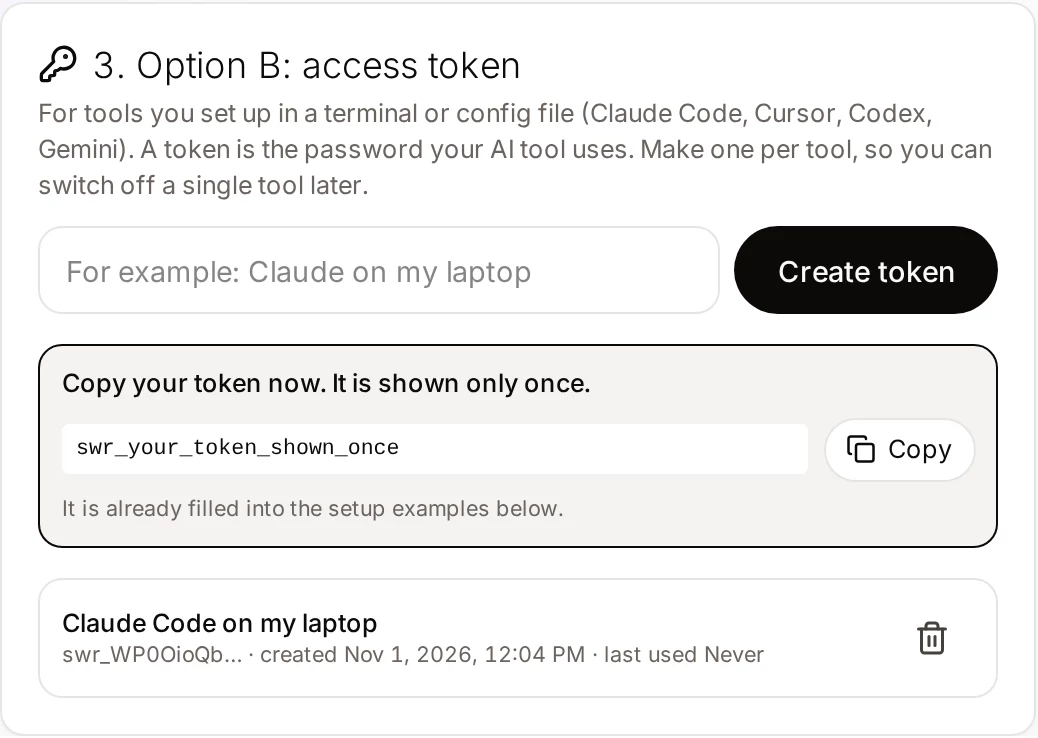
Open Connector in Clonylab, name a token “Gemini CLI on my laptop” and copy it.
Open settings.json
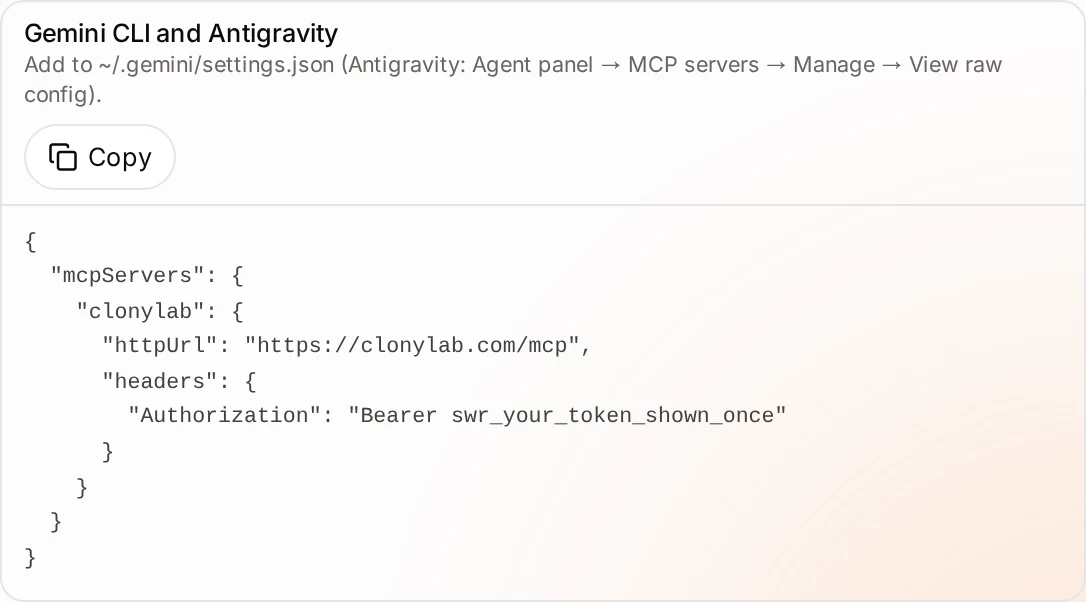
Open ~/.gemini/settings.json. If the file does not exist, create it. For Antigravity, the Connector screen says to open the Agent panel, choose MCP servers, then Manage, then View raw config.
Paste the block
Add the Clonylab server under mcpServers.
{
  "mcpServers": {
    "clonylab": {
      "httpUrl": "https://clonylab.com/mcp",
      "headers": {
        "Authorization": "Bearer YOUR_TOKEN"
      }
    }
  }
}
Allow your browser tab
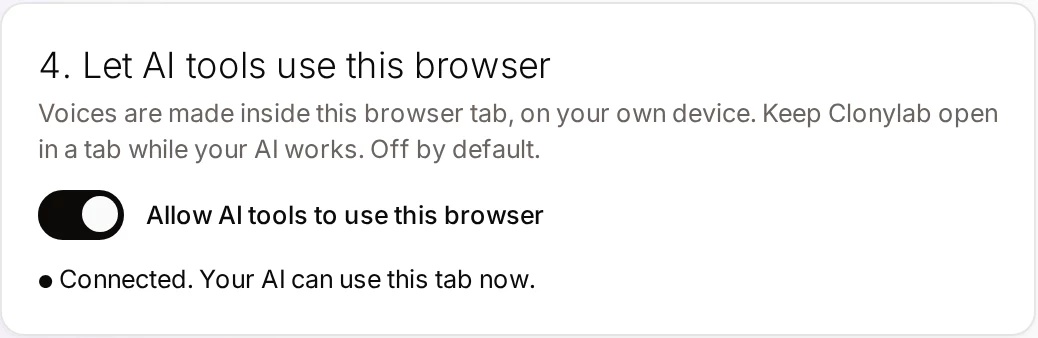
Switch on Allow AI tools to use this browser in Clonylab and keep the tab open.
04The field that trips people up: httpUrl
Gemini CLI has two web address fields, and they mean different things. Using the wrong one is the most common reason a remote server does not connect.
| Field | What it is for | Use for Clonylab? |
|---|---|---|
httpUrl | An HTTP streaming endpoint (Streamable HTTP) | Yes |
url | An SSE endpoint, the older style | No |
headers | Extra headers sent with each call, such as Authorization | Yes |
timeout | Request timeout in milliseconds. The default is 600,000, which is 10 minutes | Leave the default |
trust | When true, skips tool-call confirmations for this server. The default is false | Leave it false |
The gemini mcp add command also has flags to narrow what a server may do. The documentation lists --include-tools and --exclude-tools, plus --timeout and --trust. With --exclude-tools you could hide delete_history and set_studio_settings from Gemini completely, which is a tidy way to make Clonylab read-and-make only. Run gemini mcp add --help to see the exact format in your version.
Gemini CLI can write the entry for you. The documentation shows gemini mcp add --transport http followed by a name and the address, with a -H flag for each header. It saves to the project by default, so add --scope user (short form -s user) to keep your token out of the project.
05Check that it works
Two commands tell you whether Gemini sees Clonylab. In your terminal, run gemini mcp list. It shows each server, its settings and whether it is connected. Inside a Gemini session, type /mcp to see the same list with the tools each server offers. If Clonylab shows as connected and you see the 14 tools, you are done.
The session command also has /mcp enable and /mcp disable, which switch a server on or off without touching the file. That is useful when you want a coding session without voice tools in the way.
06Your first voice-over from Gemini
Check that Clonylab is connected and list the US male voices.Uses connection_status and list_voices.
Shorten the text in script.md to about 40 seconds of speech, then make the voice-over in a warm UK female voice and save it as script.mp3.Gemini edits the text, then uses generate_speech, get_job and get_audio.
Add a one-second pause after each heading in the script, then make it again a little slower.Adds [pause 1s] tags and sets the speed.
How many characters have I used this month?Uses usage_summary and account.
Gemini CLI asks you to confirm a tool call the first time, unless you set trust to true. For a server that can start voice-overs and delete History items, we recommend leaving the confirmation on.
07Keep your token safe
The token sits in settings.json, so the file needs the same care as a password. Keep it in your user folder, never in a project you share.
The trust flag skips confirmation for every tool of a server, including delete_history. It is a convenience for servers whose tools only read. Clonylab has tools that delete and change settings, so keep trust at false and approve each call. You can still make approval quick: read the arguments, confirm and move on.
If you think the token has leaked, delete it on the Connector screen. The tool using it stops working at once, and you can create a new one.
08If something goes wrong
| What you see | Likely cause | What to do |
|---|---|---|
| gemini mcp list shows Disconnected | The block uses url instead of httpUrl, or the token is wrong | Change url to httpUrl and check the token |
| No tools in /mcp | A JSON error in settings.json | Check the commas and the quotes |
| Unauthorized | The token was deleted or mistyped | Create a new token and update the file |
| Gemini says no browser tab is connected | Clonylab is closed or the switch is off | Open Clonylab and switch on “Allow AI tools to use this browser” |
| Works in one folder only | The server was saved to the project file | Move it to ~/.gemini/settings.json |
We took the file paths, field names and commands from the Gemini CLI documentation on 1 November 2026. The Clonylab block and the Antigravity steps come from our own Connector screen. We have not run every version of Gemini CLI or Antigravity, so check the screen in your account for current values.
09Limits, and when to use the Studio
| Topic | What to know |
|---|---|
| Plan | Pro or Team |
| Language | English only, with US and UK voices |
| One request | Up to 10,000 characters per generate_speech call |
| Browser | The Clonylab tab must stay open |
| Cloned voices | Gemini can use your clones, not create them. See voice clone MCP |
| Download links | An MP3 link works for 30 minutes |
| Studio by hand | Gemini CLI | |
|---|---|---|
| Best for | One clip you tune by ear | Voice-overs that come from files or a longer task |
| Edits the script first | No | Yes |
| Saves the file where you say | No | Yes |
| Needs the tab open | You are in it | Yes |
The AI voiceover generator page lists every script tag. If you use other AI tools too, see our guides for Codex CLI and Cline.
10Questions and answers
How do I add an MCP server to Gemini CLI?
Add an entry under mcpServers in ~/.gemini/settings.json, or run gemini mcp add. For Clonylab, set httpUrl to https://clonylab.com/mcp and add an Authorization header with your token.
Should I use url or httpUrl?
Use httpUrl for Clonylab. In Gemini CLI, httpUrl is the Streamable HTTP endpoint and url is the older SSE endpoint.
How do I see if Gemini CLI connected?
Run gemini mcp list in a terminal, or type /mcp in a session. It shows each server, whether it is connected and the tools it offers.
Does this work in Antigravity?
Yes. Antigravity can use the same MCP block. Open the Agent panel, choose MCP servers, Manage and View raw config, then paste the Clonylab entry.
Do I have to keep Clonylab open?
Yes. The voice-over is made in your open Clonylab browser tab on your own device. Keep the tab open and the browser switch on.
Is it free?
The free trial lets you try the Studio and cloning. The AI connection that Gemini uses is part of the Pro and Team plans.
Ready to let your AI make the voice-overs?
Start free with the Studio and cloning, then add Pro when you want the AI connection. English only, no card to start.
Keep reading
Sources and further reading
- MCP servers with Gemini CLI (Google) · The settings.json fields, the gemini mcp commands and the /mcp command.
- Model Context Protocol: introduction · The official explanation of MCP and what it is for.
- Model Context Protocol specification · The rules that AI apps and servers follow, including the HTTP transport.
- Model Context Protocol (Wikipedia) · A neutral overview of how MCP began and how it is used.
Last updated . The screenshots come from the Clonylab Connector screen, with the address and the token replaced by the real address and a placeholder. App and tool settings change often: if a step does not match your version, trust the Connector screen in your account.